Understanding Triton Kernels from First Principles

A deep dive into how Triton kernels work, explained from absolute basics to complete understanding.
1: The Problem
Task: Add two vectors
# CPU/NumPy (what we want to compute)
import numpy as np

x = np.array([1, 2, 3, 4, 5, 6, 7, 8])
y = np.array([10, 20, 30, 40, 50, 60, 70, 80])
z = x + y  # [11, 22, 33, 44, 55, 66, 77, 88]
Challenge: GPUs have thousands of cores
- CPU: Process elements sequentially (or 4-8 at a time with SIMD)
- GPU: Process MANY elements in parallel
- Question: How do we split work across GPU cores?
2: Parallel Thinking
Serial Approach (CPU)
for i in range(8):
    z[i] = x[i] + y[i]
One element at a time. Takes 8 steps.
Parallel Approach (GPU)
Core 0: z[0] = x[0] + y[0]    |
Core 1: z[1] = x[1] + y[1]    |  All happen
Core 2: z[2] = x[2] + y[2]    |  at the
Core 3: z[3] = x[3] + y[3]    |  same time!
Core 4: z[4] = x[4] + y[4]    |
Core 5: z[5] = x[5] + y[5]    |
Core 6: z[6] = x[6] + y[6]    |
Core 7: z[7] = x[7] + y[7]    |
All elements simultaneously. Takes 1 step!
Problem with Parallel Approach
- Vector has 1,00,000 elements
- GPU has ~1,000 cores
- Can’t give each element its own core!
Solution: Block-Based Processing
Core 0: Handles elements [0-99]
Core 1: Handles elements [100-199]
Core 2: Handles elements [200-299]
...
Core 999: Handles elements [999900-999999]
This is the fundamental concept of Triton!
3: The Complete Triton Kernel
Let’s see the full kernel first, then dissect it:
import torch
import triton
import triton.language as tl

@triton.jit
def vector_add_kernel(
    x_ptr,              # Pointer to x array in GPU memory
    y_ptr,              # Pointer to y array in GPU memory
    output_ptr,         # Pointer to output array in GPU memory
    n_elements,         # Total number of elements
    BLOCK_SIZE: tl.constexpr,  # How many elements each program handles
):
    # Step 1: Figure out which program I am
    pid = tl.program_id(axis=0)

    # Step 2: Calculate which elements I'm responsible for
    block_start = pid * BLOCK_SIZE
    offsets = block_start + tl.arange(0, BLOCK_SIZE)

    # Step 3: Handle boundary conditions (mask)
    mask = offsets < n_elements

    # Step 4: Load my data from memory
    x = tl.load(x_ptr + offsets, mask=mask, other=0.0)
    y = tl.load(y_ptr + offsets, mask=mask, other=0.0)

    # Step 5: Do the computation
    output = x + y

    # Step 6: Store result back to memory
    tl.store(output_ptr + offsets, output, mask=mask)
Understand every single line.
@triton.jit Decorator
@triton.jit
def vector_add_kernel(...):
What is @triton.jit?
- JIT = Just-In-Time compilation
- Converts Python code to GPU machine code
- Happens at runtime (first time you call the kernel)
Why JIT?
- Different GPUs need different machine code
- Triton generates optimal code for YOUR GPU
- Can specialize for specific input shapes
Function Parameters
def vector_add_kernel(
    x_ptr,              # Pointer to x array in GPU memory
    y_ptr,              # Pointer to y array in GPU memory
    output_ptr,         # Pointer to output array in GPU memory
    n_elements,         # Total number of elements
    BLOCK_SIZE: tl.constexpr,
):
What are pointers?
Memory Layout:
GPU Memory:
Address: 0x1000  0x1004  0x1008  0x100C  0x1010  ...
Value:   [  1  ] [  2  ] [  3  ] [  4  ] [  5  ] ...
         ↑
         x_ptr points here (address 0x1000)
Pointer = Memory address where data starts
Why pointers?
- GPU and CPU have separate memory
- Can’t access arrays directly, only through addresses
- Pointers tell GPU “your data is at this address”
What is tl.constexpr?
BLOCK_SIZE: tl.constexpr
- constexpr = “constant expression” = “known at compile time”
- Triton can optimize code knowing this value ahead of time
Example:
# Without constexpr: Triton generates flexible code (slower)
for i in range(BLOCK_SIZE):  # Unknown size, general loop
    ...

# With constexpr: Triton "unrolls" loop (faster)
# If BLOCK_SIZE = 4:
do_work(0)  # No loop overhead!
do_work(1)
do_work(2)
do_work(3)
Line 11: Program ID
pid = tl.program_id(axis=0)
This is THE most important line!
What is a program?
- A program = One instance of this kernel running
- When we launch, we create many programs
- Each program is independent (runs on different GPU core)
Example with 1000 elements and BLOCK_SIZE=256:
Launch: 4 programs (ceil(1000/256) = 4)

Program 0 (pid=0): Handles elements 0-255
Program 1 (pid=1): Handles elements 256-511
Program 2 (pid=2): Handles elements 512-767
Program 3 (pid=3): Handles elements 768-999
Analogy:
- Factory assembly line: Each worker (program) handles a section
- Worker 0: Items 0-99
axis=0 means what?
- Grids can be 1D, 2D, or 3D
- axis=0: First dimension (most common)
- axis=1: Second dimension (for matrix operations)
Line 14: Block Start
block_start = pid * BLOCK_SIZE
Calculate starting position for this program
Math:
- Program 0:
block_start = 0 * 256 = 0 - Program 1:
block_start = 1 * 256 = 256 - Program 2:
block_start = 2 * 256 = 512 - Program 3:
block_start = 3 * 256 = 768
Visual:
Array: [0, 1, 2, 3, ..., 999]

Program 0: [0...............255]
Program 1:                    [256...............511]
Program 2:                                         [512...............767]
Program 3:                                                              [768...999]
           ↑                   ↑                     ↑                   ↑
           0                   256                   512                 768
           block_start values
Line 15: Offsets
offsets = block_start + tl.arange(0, BLOCK_SIZE)
Create array of indices for this block
What is tl.arange?
- Like NumPy’s
np.arange - Creates:
[0, 1, 2, 3, ..., BLOCK_SIZE-1]
Example with BLOCK_SIZE=256:
tl.arange(0, 256)creates[0, 1, 2, ..., 255]
For Program 1:
block_start = 256
offsets = 256 + [0, 1, 2, ..., 255]
        = [256, 257, 258, ..., 511]
These are the indices this program will process!
Line 18: Masking
mask = offsets < n_elements
Handle boundary conditions
The Problem:
n_elements = 1000
BLOCK_SIZE = 256

Program 3:
  block_start = 768
  offsets = [768, 769, ..., 1023]

But we only have elements 0-999!
Elements 1000-1023 don't exist!
Solution: Mask
mask = [768 < 1000, 769 < 1000, ..., 999 < 1000, 1000 < 1000, ...]
     = [True, True, ..., True, False, False, ...]
           ↑                 ↑      ↑
           Valid elements    Invalid!
The mask is a boolean array:
True: This index is valid, process itFalse: This index is out of bounds, ignore it
Lines 21-22: Loading Data
x = tl.load(x_ptr + offsets, mask=mask, other=0.0)
y = tl.load(y_ptr + offsets, mask=mask, other=0.0)
Fetch data from GPU memory
Breaking Down tl.load:
1. x_ptr + offsets — Where to load from
x_ptr = 0x1000 (base address)
offsets = [256, 257, 258, 259]

Addresses to load:
  0x1000 + 256 = 0x1100
  0x1000 + 257 = 0x1104
  0x1000 + 258 = 0x1108
  0x1000 + 259 = 0x110C
2. mask=mask — Which elements are valid
3. other=0.0 — Default value for invalid elements
Why load invalid elements as 0.0?
- Easier than complex branching
- 0.0 won’t affect computation (masked out on store)
- GPU processes blocks uniformly (faster)
Line 25: Computation
output = x + y
This is element-wise addition — all 256 additions happen in parallel on GPU:
output[0] = x[0] + y[0]
output[1] = x[1] + y[1]
...
output[255] = x[255] + y[255]
Line 28: Storing Result
tl.store(output_ptr + offsets, output, mask=mask)
Write result back to GPU memory — only where mask is True.
Invalid indices (beyond n_elements) would corrupt adjacent memory.
4: The Launch Code
def vector_add(x: torch.Tensor, y: torch.Tensor) -> torch.Tensor:
    output = torch.empty_like(x)
    n_elements = output.numel()

    grid = lambda meta: (triton.cdiv(n_elements, meta['BLOCK_SIZE']),)

    vector_add_kernel[grid](x, y, output, n_elements, BLOCK_SIZE=1024)
    return output
Grid Size
grid = lambda meta: (triton.cdiv(n_elements, meta['BLOCK_SIZE']),)
triton.cdiv= ceiling divisiontriton.cdiv(1000, 256)=ceil(1000/256)= 4 programs
Kernel Launch
vector_add_kernel[grid](x, y, output, n_elements, BLOCK_SIZE=1024)
Square brackets = grid, parentheses = kernel args. Triton launches all programs in parallel; Python resumes when all finish.
5: Visual Execution Flow
n_elements=10, BLOCK_SIZE=4 → launches 3 programs:
Program 0 (pid=0):
offsets = [0,1,2,3]  mask = [T,T,T,T]
x = [1,2,3,4]  y = [10,20,30,40]
output[0:4] = [11, 22, 33, 44]
Program 1 (pid=1):
offsets = [4,5,6,7]  mask = [T,T,T,T]
x = [5,6,7,8]  y = [50,60,70,80]
output[4:8] = [55, 66, 77, 88]
Program 2 (pid=2):
offsets = [8,9,10,11]  mask = [T,T,F,F]
x = [9,10,0,0]  y = [90,100,0,0]
output[8:10] = [99, 110]  (10 & 11 skipped)
Final result: [11, 22, 33, 44, 55, 66, 77, 88, 99, 110] ✓
6: Key Concepts
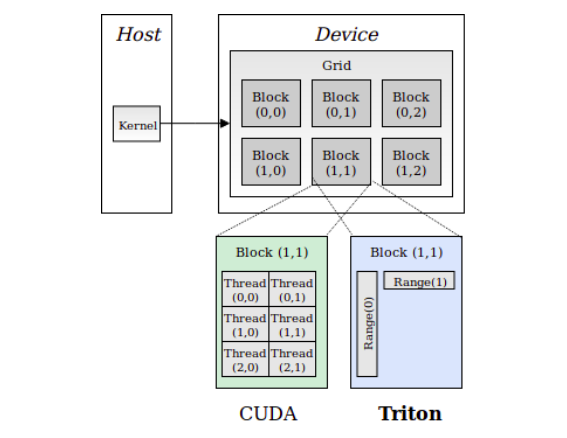
Program vs Thread
CUDA:   "I am thread 17 in block 3" — explicit per-thread indexing
Triton: "I am program 3, handling elements 768-1023" — block-level thinking
Masking Philosophy
Without mask: Complex branching, different code paths per thread
With mask:    Uniform execution — invalid elements silently ignored

GPU prefers: Do extra work uniformly > Skip work with branches
The Triton Abstraction
You write:    "Process these 256 elements"
Triton generates: Optimal thread grouping, vectorization, memory coalescing

vs CUDA:
You write:    "I am thread X, do my 1 element"
You handle:   Everything yourself